
Guide
Sharing and privacy: you decide who sees your habits
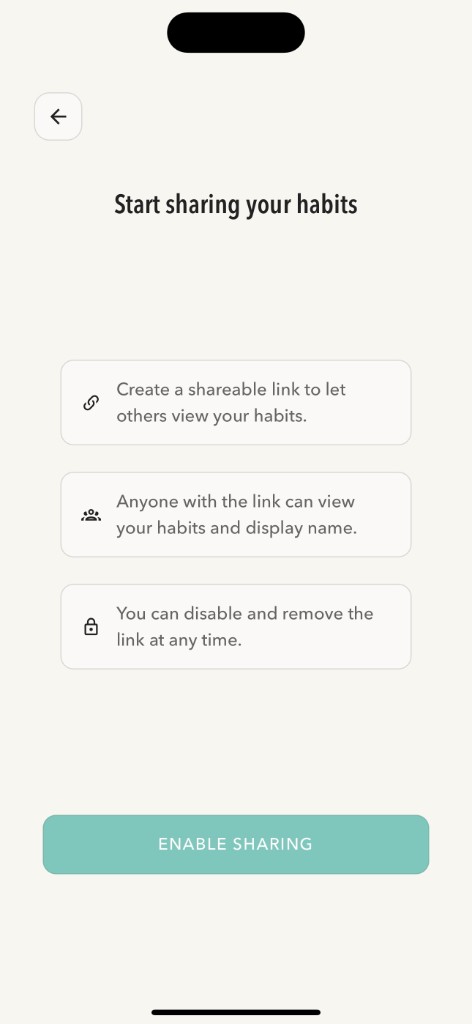
Nothing in PublicHabits is public until you turn on sharing. When you do, you get one link, and you decide who gets it: your partner, your friends, a group chat, or your audience on social media. Your email and account details always stay private, and you can turn sharing off anytime.
What’s public by default?
Nothing. When you create an account, sharing is off and your habits are visible only to you. There are no public profiles, no user directory, and no way to search for other people in PublicHabits.
Exactly what people with your link see
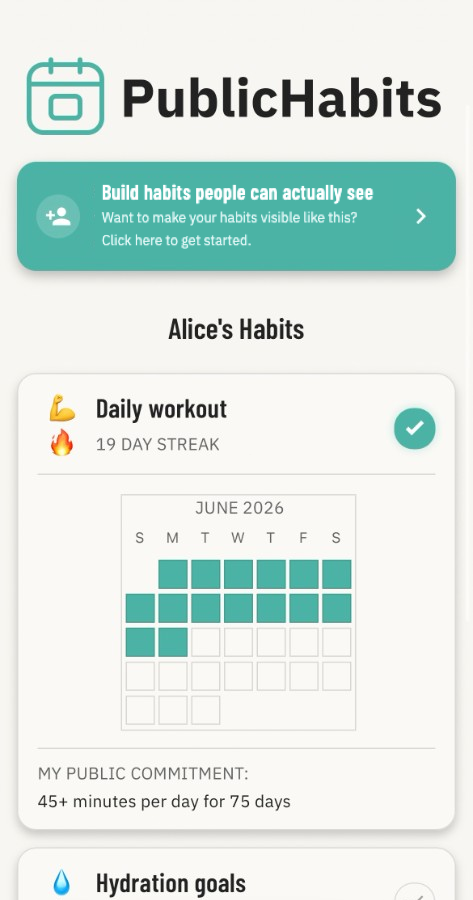
Your page shows your progress and nothing else. Here’s what’s on it, and what always stays private:
| Information | Visible to people with your link? |
|---|---|
| Display name | |
| Habit names, emoji, and public commitments | |
| Calendar of logged days | |
| Streaks and days free | |
| Comments you add to habits | |
| Automatic notes when you edit a habit | |
| Email address | |
| Subscription and payment details | |
| Reminder settings and other preferences |
Only you can change your page
People with your link can see your progress, but nobody can log habits, edit anything, or leave comments on your page. They don’t need an account to look. You never know when someone who knows you might look, and that’s exactly what makes skipping a day harder.
One link, one page
Sharing is simple: there’s one link per account, and everyone who has it sees the same page, with every habit on it. The people watching see your whole record, not a highlight reel.
Your page is not searchable
We ask search engines not to include your PublicHabits page in their results, and PublicHabits doesn’t list users anywhere. The way people find your page is through your link.
Turn sharing off anytime
- Open the share screen in the app.
- Tap Disable sharing and confirm.
Your link is permanently deleted, and anyone who opens it will no longer see your habits. If you turn sharing back on later, you get a new, different link, and the old one stays dead.
Share with confidence
- Pick a display name you’re comfortable with. It doesn’t have to be your full name, and you can change it in account settings.
- Keep sensitive details out. Habit names, public commitments, and comments are all visible to anyone with your link.
- Share with people you trust. Anyone with your link could forward it; send it to people you’d be glad to have watching.
- Start fresh whenever you want. Disabling and re-enabling sharing gives you a new link.
Frequently asked questions
Who can see my habits on PublicHabits?
Only you, until you turn on sharing. After that, anyone with your link can see your display name and your habits, including streaks, calendars, public commitments, and comments.
Is sharing on by default?
No. Sharing is off when you create your account. Nothing is visible to anyone else until you turn it on.
Do people need to log in to see my habits?
No. Anyone with your link can open your PublicHabits page in any web browser. They don’t need to log in, create an account, or download the app.
Can I hide a single habit from my public page?
Sharing covers every habit on your account, so the people with your link see your whole record, not just the highlights.
How do I stop sharing my habits?
Open the share screen and tap Disable sharing. Your link is permanently deleted. If you turn sharing on again, you’ll get a new, different link.
Can people with my link see my email address?
No. People with your link see your display name and habits. Your email address, subscription details, and settings are never shown.