
Guide
Why make your habits public?
Because a habit nobody can see is easy to quit. When your streaks and missed days live on a page that people who know you can open, skipping “just today” gets a lot harder. PublicHabits is a behavior change app built around that idea, available on iOS, Android, and the web.
Why private tracking doesn’t stick
If you’ve tried habit trackers before, you know how it goes: a strong start, a missed day, and then the app quietly stops getting opened. The tracker wasn’t the problem. When you’re the only one who can see your progress, a missed day costs nothing, and neither does giving up.
Making your habits public changes that. Once people who know you can see your record, every day counts, including the days you don’t feel like showing up.
What changes when your habits are public
Skipping a day gets harder
People behave differently when they know they might be observed. Psychologists call this the Hawthorne effect. Nobody has to check your page every day for it to work. You never know when someone will look, so “I’ll skip just today” gets a lot harder to say.
Your word is on the record
Every habit starts with a public commitment in your own words. If you change it later, say from “30 minutes a day” to “20 minutes a day,” PublicHabits adds a dated note that people with your link can see. You can’t quietly lower the bar.
A missed day doesn’t erase your progress
Miss a day and your streak starts over, but every day you’ve already logged stays on your page. The people watching see an honest record of you showing up again and again, and that record becomes something worth protecting.
You get all of this without paying a coach, scheduling check-ins with an accountability partner, or putting money on the line. See how PublicHabits compares with other habit apps.
How PublicHabits works
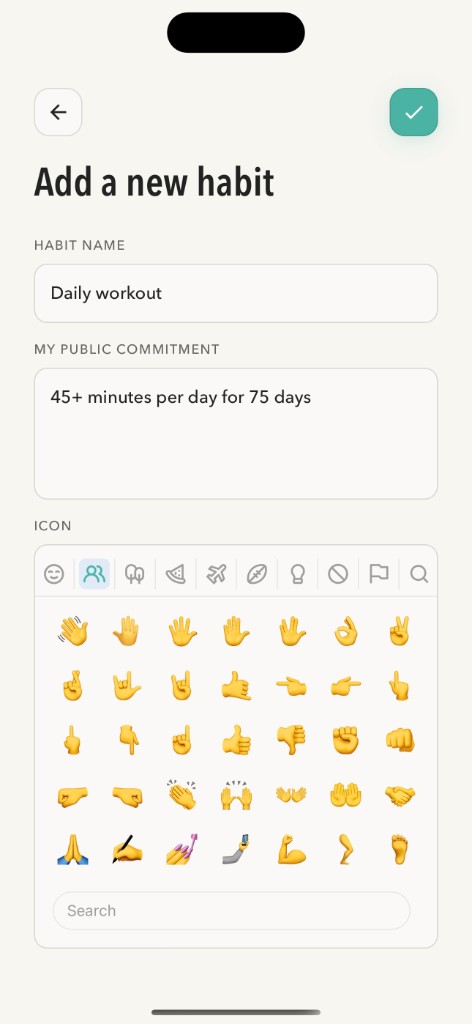
- Create a habit and write a public commitment. Name the habit and write what you’re committing to in your own words; for example “45+ minutes of exercise per day for 75 days.” Choose whether it’s a good habit to build or a bad habit to break.
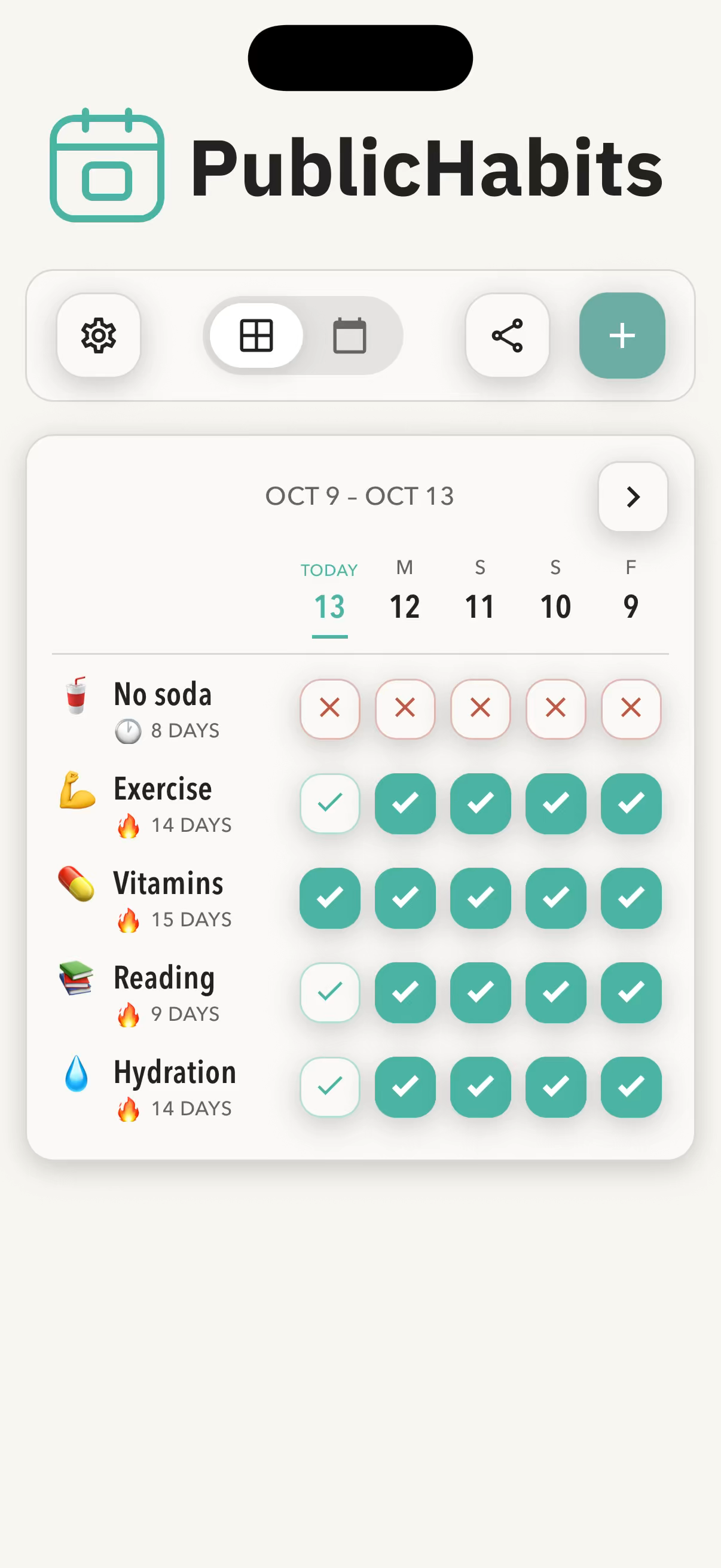
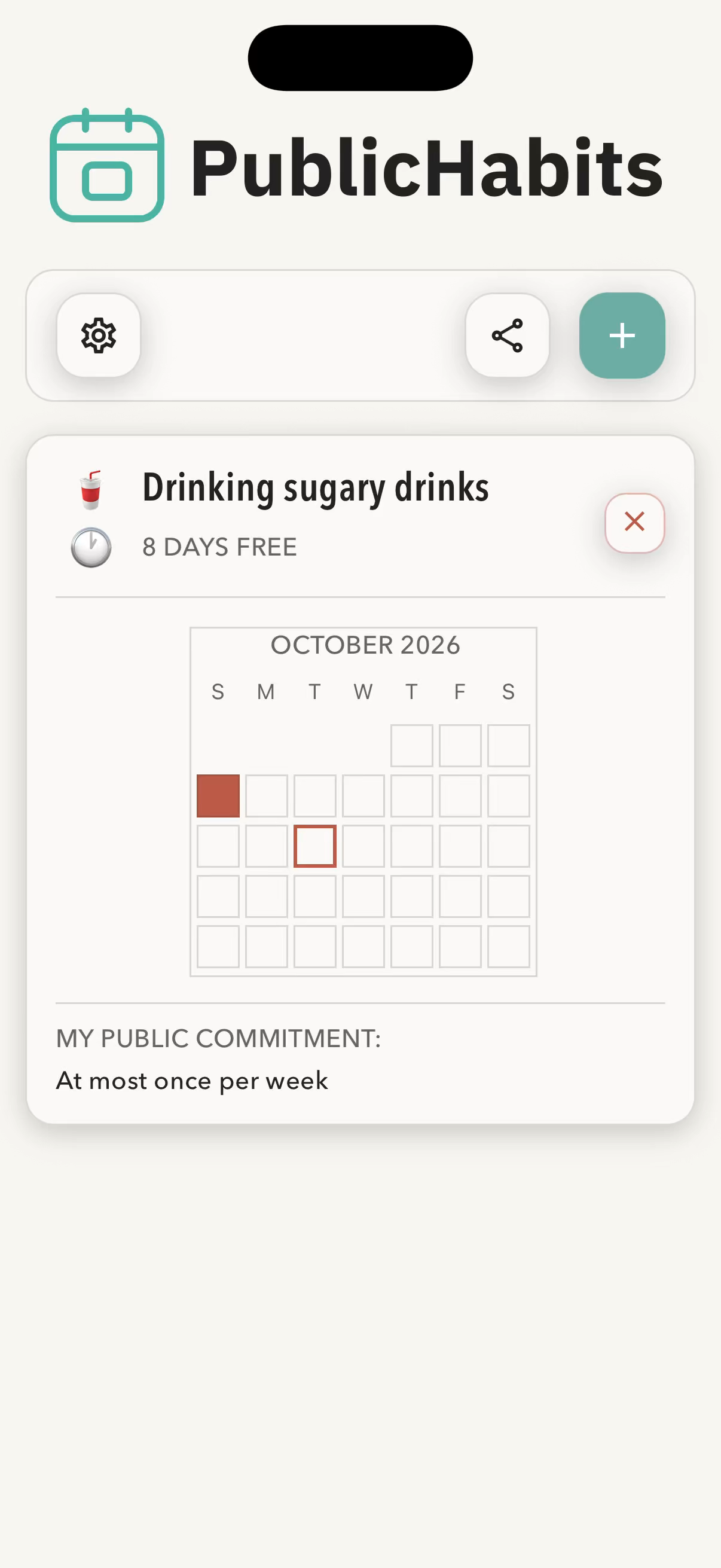
- Check in each day. Tap to log the habit. Each logged day fills in on a calendar-style grid, and your streak counts how many days in a row you’ve followed through. For a bad habit, you log slip-ups instead, and the counter shows how many days you’ve gone without one.
- Turn on sharing. Sharing is off until you turn it on. When you do, PublicHabits creates one link to your PublicHabits page. Send it to friends and family, or post it to your social media bio.
- Keep showing up. Anyone with the link can open your page in a web browser to see how you’re doing. They don’t need an account or the app. You can turn sharing off at any time.
What people with your link can see
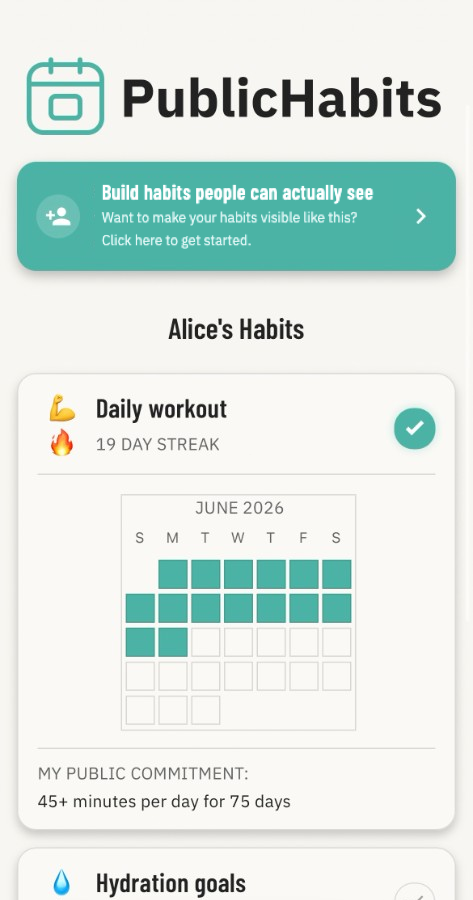
When sharing is on, people with your link see:
- Your display name, which you choose
- Every habit on your account, with its name and public commitment
- A calendar of the days you logged each habit
- Your current streak, or for a bad habit, how many days free
- Comments you’ve added, like why you missed a day, plus automatic notes when you change a habit’s name or public commitment
Your email address and account details stay private, and nobody but you can log or change anything on your page. Sharing and privacy has the full details.
Who PublicHabits is for
PublicHabits is for you if you:
- Have started and abandoned habit trackers before
- Want accountability without scheduling check-ins with a partner or paying a coach (see alternatives to a coach or accountability partner)
- Are working toward a goal you want people to see you reach, like a daily workout, a study routine, a 75-day challenge, or cutting out junk food
- Already share your progress with an audience on social media
Key terms
- Public commitment
- A sentence you write for each habit describing what you’re committing to. It appears on your PublicHabits page. If you change it later, a dated note records the change.
- Streak
- The number of consecutive days you’ve logged a habit. If you miss a day, it starts over. The days you already logged stay on your calendar.
- Days free
- For a bad habit you’re trying to break, the number of days since you last logged it. Each slip-up is marked on the calendar.
- PublicHabits page
- The web page that shows your display name and habits to anyone with your link.
- Share link
- The unique link to your PublicHabits page, created when you turn on sharing. Turning sharing off permanently deletes it.
Frequently asked questions
Will people actually check my page?
They don’t have to check it every day. What changes your behavior is knowing that someone who knows you might look at any time. That possibility is what makes skipping a day harder.
Do people need an account to see my habits?
No. Anyone with your link can open your PublicHabits page in a web browser without creating an account or downloading the app.
Can I make only some of my habits public?
Sharing covers every habit on your account, so the people with your link see your whole record, not just the highlights.
Does PublicHabits post to social media for me?
No. PublicHabits never posts anything on your behalf. You decide where your link goes, whether that’s a text to one friend, a message in a group chat, or a link in your social media bio.
What happens if I miss a day?
Your streak starts over and that day stays blank on your calendar. Nothing is deleted and there’s no penalty. Everything you’ve already logged stays on your page, so people with your link see an honest record, not a perfect one.